

ChatGPT Work Now Learns to Write in Your Voice
ChatGPT Work has picked up a new setting that mimics your personal writing style — your favorite phrases, your signature sign-off, and even quirks like how you handle capitalization. The feature learns from the tools you use every day: Gmail, Google Drive files, Slack conversations, and SharePoint documents.
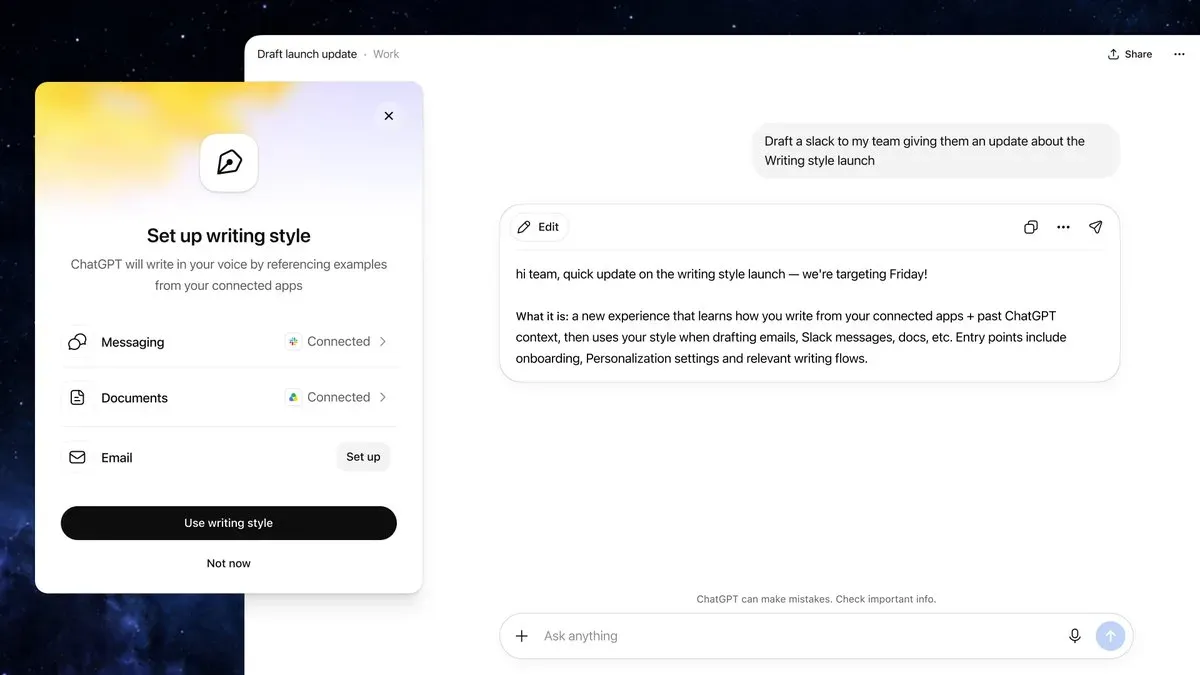
Until now, getting an AI to "write like me" meant manual workarounds: pasting sample text into the prompt or writing long instructions about tone and voice. Now it's becoming a built-in setting — connect your sources once, and the style is applied automatically to every subsequent message in ChatGPT Work, whether you're on the web or in the mobile app.
You can turn it on from the web version under Settings → Personalization → Writing style. The feature is available on all paid plans that include ChatGPT Work access.
The practical upside is obvious to anyone who edits AI-generated text to sound more like themselves: less manual polishing after every draft. That said, the model is learning from your actual work correspondence and documents, so before switching it on it's worth deciding which inboxes and folders you're comfortable granting access to. Test the results on a couple of real drafts first, then apply it to anything important.
What This Means Going Forward
If your team relies heavily on AI for writing, personal style transfer is worth discussing as its own topic — where automatic voice-matching genuinely saves editing time, and where manual instructions and strict data-access controls remain the smarter choice.
As AI writing tools get better at sounding like us, the real differentiator won't be whether a tool can mimic your voice — it'll be how thoughtfully teams manage the data access that makes that mimicry possible.