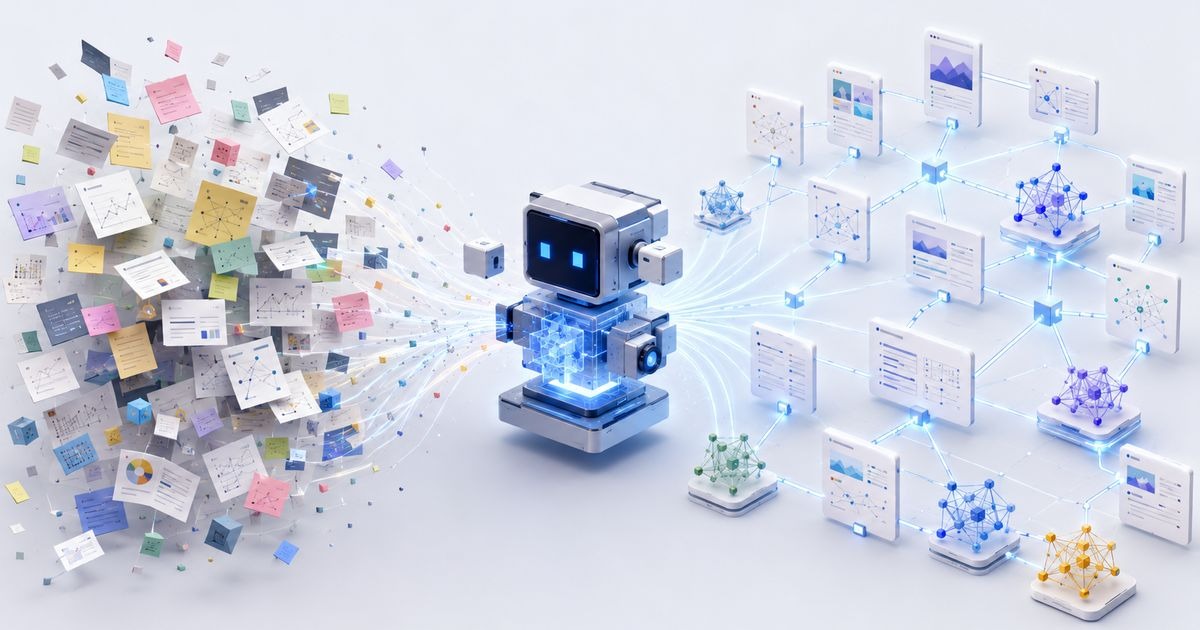
This is an adaptation of Ben Holmes's piece on a system where AI agents automatically turn your raw notes into an organized, interconnected knowledge base — complete with tags, sources, wikis, and visualizations.
You may have heard Andrej Karpathy talk about "LLM wikis." They transform your scattered thoughts into easily navigable notes, wikis, and visualizations. It's an incredibly powerful tool for researchers, developers, chaotic note-takers — basically everyone.
Here's a system that gets agents to organize your "second brain" automatically:
Start taking notes in Markdown format. Add an /enrich-note skill that tasks agents with adding tags, sources, and backlinks. Add a wiki skill that assembles notes into a persistent knowledge base. Set up automations that run these skills on a schedule. Add visualizations that build from your notes in real time.
Step 1: One Folder of Raw Markdown
We'll keep notes in Markdown so agents can easily work with them. You can use Obsidian, or if you want something friendlier — closer to Apple Notes — try Hubble.md, an app I built myself.
Following Karpathy's advice, all handwritten (or voice-dictated) notes go into a raw/ folder. These are raw, unfiltered thoughts that our agents will process later.
Here's an example I dictated using a voice transcription tool after listening to an episode of the Acquired podcast about Ferrari. Notice there's no metadata and no backlinks. Honestly, you don't even need a title — the agent will fill in all those details for you.
Step 2: The /enrich-note Skill
Now let's have agents enrich these notes with details that make them searchable. I wrote a skill called /enrich-note for this. Like all the skills mentioned in this piece, it can be installed with a single command from the skills repository.
The skill does three things:
Tags. The skill maintains a shared tag registry as a tags.md file, where each tag comes with a one-line description. I recommend creating tags tied to source type (blog, podcast, video) and separate tags for topics and areas of interest (ai-hardware, business, rust). The agent is also instructed to reuse existing tags and be reluctant to invent new ones — otherwise, agents tend to generate way too many tags.
Sources. If a note came from somewhere (a podcast, book, video), the agent does a quick web search, finds the source URL, and records it in the frontmatter.
Related notes. The agent scans the rest of your archive for genuinely related notes and adds them as wiki-links in a ## Related section.
This can get expensive, but no more so than assigning an agent a coding task in a small-to-medium repo. I personally have hundreds of notes. If you test this on a larger archive, let me know what you learn and what optimizations you find.
After processing, that same Ferrari note from the Acquired podcast looks quite different. Notice the enrichedAt timestamp — the automation uses it to know which notes have already been processed. Idempotency matters once you start running the skill on a schedule.
Step 3: The Wiki Skill
Enriched notes are already searchable, but they're still fragments. The next level is a wiki: a persistent, interconnected knowledge base the agent builds from your notes. This comes straight from Karpathy's llm-wiki gist, which I recommend reading in full.
The core idea: ask the agent to generate a navigable homepage around some area of interest (in my case, coding-agent techniques or religious studies). This is useful for you, since it creates a scannable index of people, places, and things. But it's also useful for the agents themselves when navigating your notes to answer questions.
Instead of RAG-style retrieval, where the model "rediscovers" your knowledge from scratch for every question, the agent maintains a cumulative artifact: entity pages, topic summaries, an index, a changelog. As Andrej puts it: "The LLM is the programmer, and the wiki is the codebase."
To get started, paste the gist into your agent along with one sentence describing what you want. Something like: "Read this: [gist link]. Set up a wiki in wikis/latest-ai/ that tracks coding-agent techniques from my notes — model prompting, orchestration patterns, useful agent skills, etc. Pull in everything relevant from raw/."
The agent builds out the folder structure, writes its own AGENTS.md schema with maintenance instructions, and ingests your existing notes.
Next, I wrote a skill to "refresh" this wiki over time — /refresh-wiki. It looks for new or changed notes in raw/, pulls relevant ones into each wiki, updates entity and concept pages, and checks for contradictions, orphaned pages, and outdated claims.
Here's a trimmed-down view of the index.md for my "Latest in AI" wiki. It's built from notes on podcasts and videos over the past few months, and each entry links to a full page that the agent writes and maintains.
I also keep a Bible study wiki based on Lee Strobel's book The Case for Christ. The book is a long series of interviews with experts, so the agent built a "people" index with a page for each interviewee: who they are and what they claimed. This genuinely helps me revisit arguments weeks later — without a glossary, the names all blur together for me.
Step 4: Automations
Skills are useful, but I don't want to manually rerun them every time I browse my notes or ask the agent a question. Both skills have looping variants designed for scheduled runs:
/enrich-notes-loop wraps /enrich-note and processes all recently created notes, using enrichedAt to skip ones already handled.
/refresh-wiki scans your wikis/ folder and updates every wiki it finds. (Keep your wikis in a wikis/ folder — all of this is customizable.)
There are two approaches worth trying: local automations to get started, and cloud automations to make things robust.
Local Automations via Codex
There are several ways to schedule runs. One is a local automation running on your machine, waking up on a cron schedule to tidy up your notes folder. The Codex app offers this under the Scheduled tab.
Click "Create with chat," select the folder where your notes live, and specify the skill to run. I recommend a nightly run. For /enrich-notes-loop, you can dial the reasoning level down since the task is less ambiguous. For wiki generation, a higher reasoning level lets the model be more thoughtful and creative. Tune this to your needs.
Cloud Automations
Local automations are the easiest to set up, but they have an obvious downside: your computer needs to be on and running for the task to execute. Codex does try to keep scheduled jobs running even with the laptop lid closed. Still, when I traveled out of town for a few days, my automations stopped working — I'd forgotten to plug in my laptop. 🤦♂️
oz.dev — to spin up a cloud sandbox connected to open-weight models. Obsidian Sync — to sync Markdown notes to the cloud. Obsidian's headless CLI — to access those notes programmatically from the cloud sandbox.
Oz is Warp's cloud platform for hosting agents. Yes, you mostly pay for token usage. But open-weight models like Kimi k2.6 are very token-efficient (3-4x more efficient than Claude models) while still being high quality.
Here's what each scheduled run looks like: the agent pulls the archive into the cloud sandbox via the Obsidian CLI, runs /enrich-notes-loop or /refresh-wiki, then pushes the results back, which sync to your machine.
I wrote two more skills to run this with the necessary cloud sandbox setup: /enrich-notes-loop-cloud and /refresh-wiki-cloud. These are thin wrappers that sync the archive down, run the base skill, and sync it back up.
Setting up the environment and schedule is just a handful of oz CLI commands, so I turned that into a skill too: /setup-oz-automations.
First, create an account: go to oz.dev and click "start an agent." That'll take you to a sign-up flow. Then install the skills (if you haven't already) and hand the rest to your agent.
Run the /setup-oz-automations skill. It checks whether you have Warp's Oz platform skill installed (installing it via npx skills add warpdotdev/oz-agent-skill if not), asks for your archive name and Obsidian auth token, then creates the environment and both schedules: nightly note enrichment and weekly wiki refresh.
Any schedule can be paused with oz schedule pause, and every run leaves behind a session transcript you can review in the Oz dashboard.
Step 5: Visualizations
So now we've got a beautiful network of Markdown files with tags, backlinks, index pages, and deep wikis. But what if we go beyond text? Since it's all just Markdown files in one folder, an agent can build interactive HTML visualizations on top of them.
I made a couple of examples you can hook into your own system, as long as your notes live in a raw/ folder:
Notes burndown — a GitHub-style activity graph showing how you've been journaling over time. I use it to build a habit of regular journaling.
Thought constellation — shows notes as a graph, clustered by your most common tags (a byproduct of /enrich-note). This helped me find my most-referenced notes worth revisiting, and spot gaps where I should focus more (apparently I need to read more...).
These can be one-off visualizations refreshed on a schedule, similar to the /enrich-note and wiki examples. But if you want them updating "live" by reading files straight off disk, you can view them inside Hubble.md — the Markdown note-taking app I mentioned earlier. It lets you view HTML apps alongside your notes and injects a runtime API for reading files in the current folder, so you can build visualizations that update programmatically.
Just Start Writing
All the skills and visualizations mentioned here live in this GitHub repo. To get started, just ask your agent to convert your existing notes to Markdown (Apple Notes, Notion, Granola, and others all support this). Then try out some of the skills I've shared and see if they're useful to you.
Build a wiki around your next research project, hobby, or coding session with an agent. Come up with a new visualization and share it. I'm curious what you build. And yes — go try oz.dev and Hubble.md :)